
Information Linking
URLs from Morphbank - External Links
Add Uniform Resource Locators (URLs) easily to any Morphbank Object (image, specimen, view, locality, publication, taxon name). When a user
uploads data and images to Morphbank, each record uploaded can have one or more urls linking the Morphbank Object to a site outside Morphbank.
These are in the http:// format and can be edited by the Morphbank Contributor as needed by clicking the
 Edit icon for a given object.
External Link Samples
| Label Morphbank User Clicks | Label Points to this user-supplied URL | See these URLs in Morphbank |
|---|---|---|
| Teleost Anatomy Ontology TAO:0001250 | http://bioportal.bioontology.org/virtual/1110/TAO:0001250 | http://www.morphbank.net/?id=478760 |
| Handbook of Nearctic Chalcidoidea | http://codex.begoniasociety.org/chalcidkey/ | http://www.morphbank.net/?id=228786 |
| 28S | http://www.ncbi.nlm.nih.gov/entrez/viewer.fcgi?db=nucleotide&val=AY675671 | http://www.morphbank.net/?id=80200 |
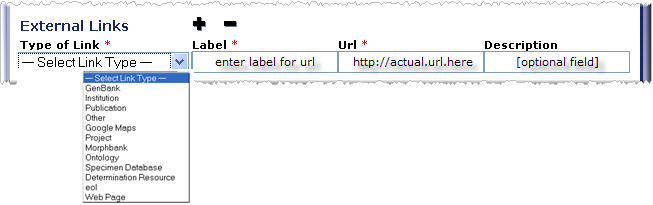
These URLs can be added at the time the object is created or added later during an edit session. Example: Users may add an image to the database and point to a museum web site where the original specimen is located. The museum URL is added as an external link to the image record.
The Add Image (Specimen, View, Locality, Publication and Taxon Name) forms all have this option that appears as:
URLs to Morphbank - Internal Links
All Morphbank Objects (image, specimen, view, locality, publication, taxon name) have unique identifiers - numbers that are unique within Morphbank. From anywhere outside Morphbank (from a journal article, a web site, a conference or workshop paper), a Morphbank Contributor creates a URL back into Morphbank using the base URL (http://morphbank.net/) + the unique identifier for a specific object.
Internal Link Samples
| Base URL | Morphbank Object Id | Actual Internal Link to Morphbank | What the Link Returns |
|---|---|---|---|
| http://morphbank.net | 478760 | http://morphbank.net/?id=478760 | Morphbank Image Metadata + 400px image |
| http://morphbank.net | 228716 | http://morphbank.net/?id=228716 | Morphbank Specimen Metadata + 400px image |
| http://morphbank.net | 575098 | http://morphbank.net/?id=575098 | Morphbank Collection |
| http://morphbank.net | 464413 | http://morphbank.net/?id=464413 | Morphbank Annotation |
| http://morphbank.net | 579435 | http://morphbank.net/?id=579435 | Morphbank Image Metadata + 400px image |
| http://morphbank.net | 579435 | http://morphbank.net/?id=579435&imgType=jpeg | Morphbank Image jpeg |
| http://morphbank.net | 579435 | http://morphbank.net/?id=579435&imgType=thumb | Morphbank thumbnail |
| http://morphbank.net | 579435 | http://morphbank.net/?id=579435&imgType=jpeg&imgSize=500 | Morphbank Image with user-specified width |
Contributors may link back to (reference) the metadata for any object in Morphbank, using the Morphbank unique id for that object. -- The Morphbank Show feature was created to gather and present the associated metadata for a given Morphbank record in one window. The Show pages provide easy, direct access via Uniform Resource Locators (URLs) to data objects in Morphbank that may be used by other data repositories. Example: scientists may cite the Morphbank web site and display images and data in journal, conference, and workshop research papers. A person outside of Morphbank may then use that referenced URL as a direct link back to the data or image located in the Morphbank database. In other words, the Morphbank web address plus the Morphbank id create this link.
In addition to creating an http:// address to link to a Morphbank Show page, other types of http:// links to specific images are possible. For example, a user may wish to point someone to the image directly, not the metadata. For more about the types of Internal Links (links back into Morphbank from outside), ...
Getting Morphbank Ids to Build URLs
Via Services, users retrieve Morphbank Ids for various objects. Using these ids, Contributors create urls and may also build other websites that utilize web services, pulling images via their ids. See Morphbank Web Services in this online user manual for more details.
Next
Contents
|

