
Browse - Sorting Search Results
After browsing any Morphbank object like images, specimens, views, localities, publications, and collections via the My Manager interface, the user will be presented with a list of sort criteria options for sorting the search results. These options vary for each Morphbank object. Check out the various sort criteria options on each My Manager tab found in the left side-bar.
Example - Sorting Images: To sort the list of images after a search, select the Sort By criteria from the drop down list(s). The more criteria selected, (up to 3 levels) the more refined the browse will be. The resulting page will display the images list with the initial Sort By option grouped together first, followed by groups of any of the other sort criteria selected.
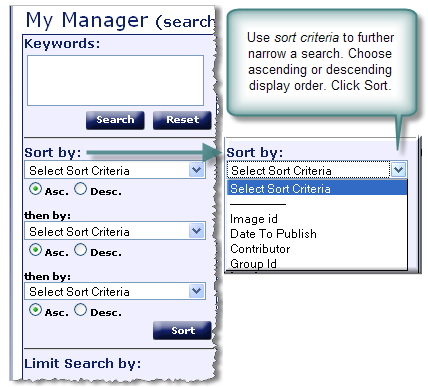 Sort criteria for images are listed next.
- Image id: unique Morphbank-issued id for an image
- Date To Publish: the date an image in Morphbank appears to the general public.
- Contributor: person responsible for contributing the data and images to Morphbank. Also referred to as the User.
- Group Id: Morphbank Groups (like all Morphbank objects) have Ids. A search result may contain objects from several groups. This sort criteria would order the objects by Group Id.
Use the  to clear the Keyword Search and Sort By boxes of all criteria.
Next |
Contents |

