
Edit Publication
- Publications added to the Morphbank database can be edited.
- A user may edit data for any publication they have entered into the system or submitted for some other contributor.
- Any group coordinator or lead scientist may also edit publications entered by anyone in their group.
- Publications may be related to any object in Morphbank including specimens, images, collections, annotations, views, and localities.
- After login Header Menu > Tools > My Manager > Publications
This path gives the user access to all publications they have entered. Use the Keyword Search and/or the Limit Search by feature to find specific publications. -
After login Header Menu > Browse > Publication > keyword search for publication and Click

From this path, the user can see all the publications in the Morphbank database and will search to find the specific one to edit.
After login, then Header Menu > Tools > My Manager > Publications > keyword search > click Edit Icon path:
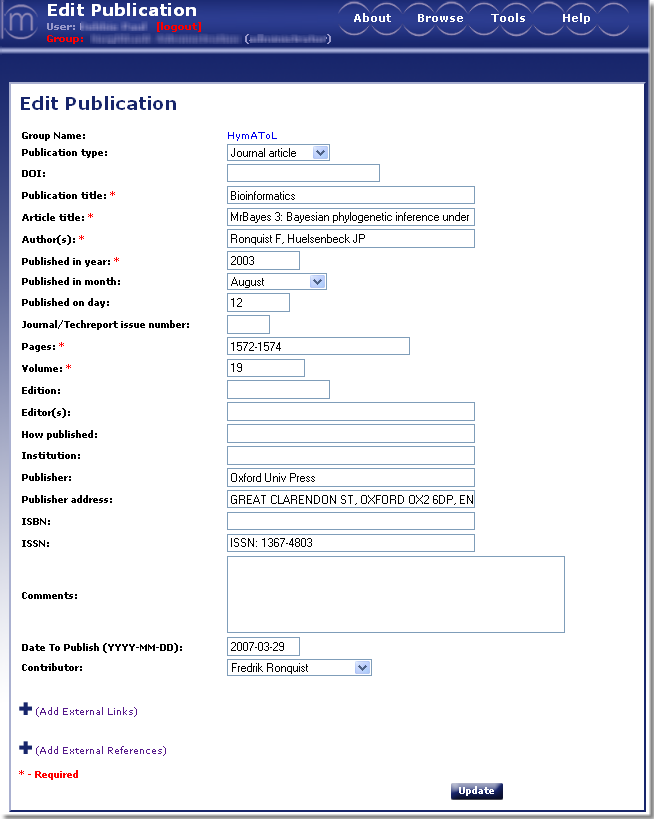
Data that must be entered on the Edit Publication screen varies with the type of publication selected. Note the required fields are indicated by a *.
If a user is logged-in, they may Browse - Publications to find the publication they wish to edit. Once
found, click on the to open
the Edit Publication screen for this publication only.
from If logged-in> Browse> Publication> Find Publication and Click
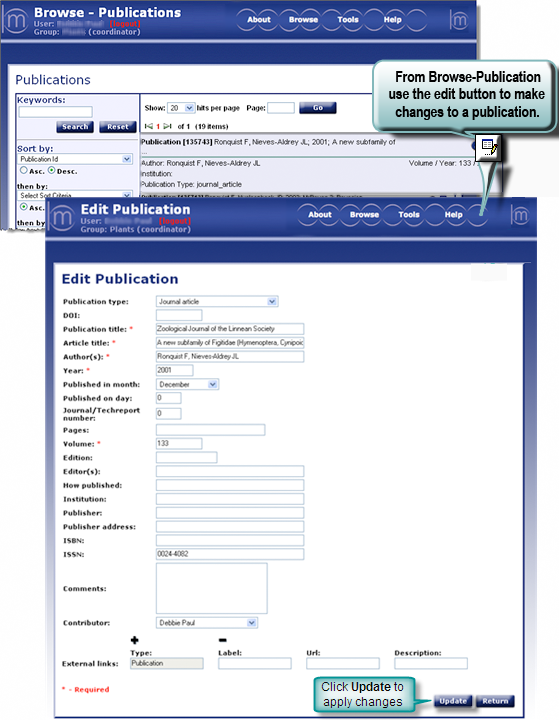
- Publication Type: Choose the type of publication from the drop-down.
- DOI®: a digital identifier for any object. If the publication being submitted has a DOI®, enter it here. For more information on DOI®'s go to http://www.doi.org/index.html
- Publication Title: Enter the name of the publication here. This field is case sensitive.
- Article Title: Enter the title of the article here as you wish it to appear in the database.
- Authors: Add Author names here, use the following [last name][first name initial][comma] format: Smythe J, Braun K
- Published in year: Enter year here
- Published in month:If applicable, enter month.
- Published on day: If applicable, enter day.
- Journal/Techreport number:
- Series:
- Organization:
- School:
- Pages:
- Chapter:
- Volume:
- Edition:
- Editor(s):
- How published:
- Institution:
- Publisher:
- Publisher address:
- ISBN:
- ISSN:
- Comments:
- Contributor: Select the name of the contributor (person having the authorization to release data and images to the public) from the dropdown list. The contributor can be different from the submitter (person entering the data). If you need to add new entries to this list, please contact mbadmin at scs dot fsu dot edu.
Morphbank provides an option to add External Links and / or External Unique Identifiers to this record. For complete instructions on providing links refer to External Linking in the Information Linking section of this manual.
When the Edit Publication form has been completed, Update to complete the edit publication process. A message will confirm that you have successfully edited a publication. From this point the user can continue to edit additional publications or return to the Edit Publication screen.
Next |
Contents |

