
Select Groups
In Morphbank, a user may belong to one or more Groups. Groups are usually formed by a set of individuals for the purpose of collaboration. Membership in a group is also part of the security model Morphbank uses to determine what objects can be seen (or not) by a given individual. To find out more about Morphbank Groups and Group Roles go to the Users and Their Privileges page.
After login, ...
- the user sees the Images tab of the My Manager interface.
- new drop-down options (like Taxon Search) become active under Browse and new drop-down options appear under Tools and Help in the header.
Find and Select a Group
Note that the Group and User (aka Contributor) are displayed with each Morphbank image (as well as with other Morphbank objects). The group(s) module(s) to which the user belongs can be accessed from two places (see below):
- hover over Group in the header or
- from the Tools > Select Group > [choose group from sub-menu].
- Make a group selection (click on group name) that corresponds to the information that will be worked on in the current session.
- To work within another authorized group choose again from one of the above two menus.
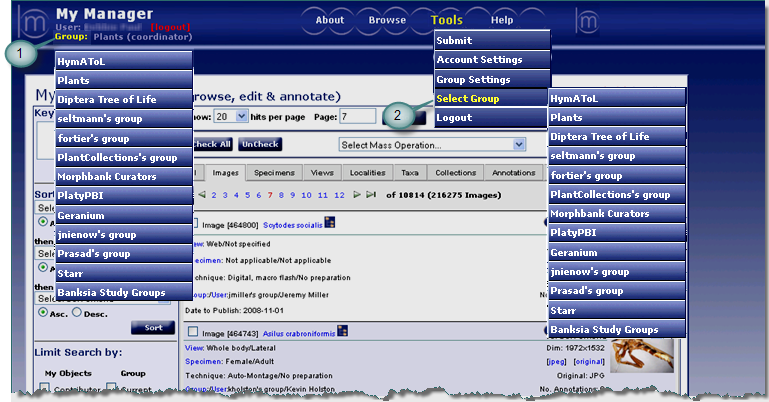
Everyone, logged in or not, uses this My Manager interface. Once logged in, and after group selection, the user has new menu options under Tools such as Submit, Group & Account Settings. Once logged in, contributors can now Edit their objects found in each of the My Manager tabs. Some options not seen above in the Tools menu like Manage Mirror are based upon login permissions and are not available to all Morphbank members. Each My Manager Tab allows users access to their own objects as well as other's objects if they are published.
To Submit objects to Morphbank: Login, Select a Group, go to Header Menu > Tools > Submit > select the
type of object to be uploaded and then enter the required data. Group selection is important. If you need to keep the images private for a
time, all the members of the group you are in when you upload will see the images. Any other Morphbank members or the public will not see these
images. If you are a member of multiple groups, select the group whose members need to be able to see the images, before you upload.
Next |
Contents |

