
Specimens tab - My Manager
All the features and tools found here are used the same way in other tabs of My Manager. All Specimens contributed/submitted to Morphbank will be seen in this tab.
Path to the Specimens tab after login is Header Menu > Browse > Specimen. Or, click Browse in the Header, then click on the Specimen tab.
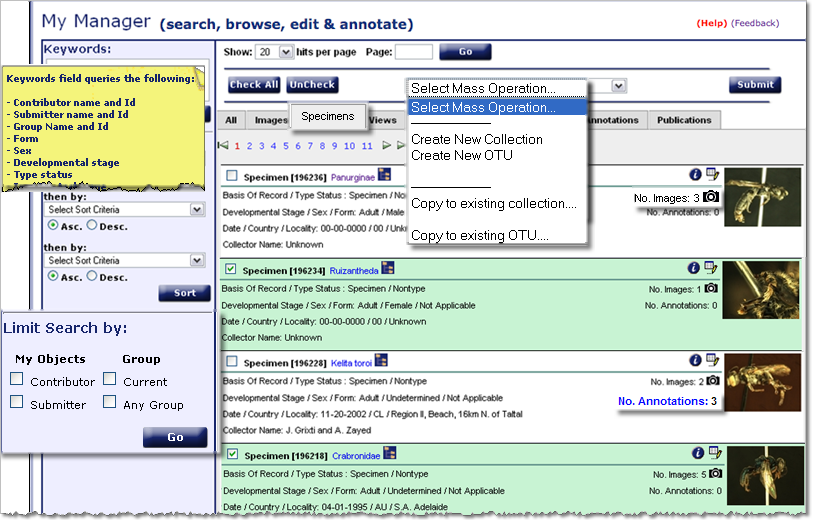
Features and Functions of the Specimens tab
Morpbhank users catch on quickly due to the modular nature of the tools and icons. Note the various features in the above screen shot are explained next.
 : please use this link to our automated feedback system. We appreciate your comments so that
we can continue to improve and enhance Morphbank. Clicking on (Help) opens this Manual.
: please use this link to our automated feedback system. We appreciate your comments so that
we can continue to improve and enhance Morphbank. Clicking on (Help) opens this Manual.- Keywords: To use this powerful search feature, hold the mouse over the Keywords box to see a list of fields the Keywords queries. Enter a term or terms. Note that searches are boolean and. Partial words can also be entered as all terms entered are wild-carded.
- Limit Search by:allows a user to easily limit their view to only the objects personally contributed/submitted AND/OR those from a particular group. Use the Header Menu > Tools > Select Group > Choose group from sub-menu feature to change groups OR use the Group link in the Header on the left side of the Main Screen.
- Check box: Note the
 to the left of each Specimen Id and Title.
Use this feature to Select one or more Specimens which will be highlighted. Ruizantheda and Crabronidae are selected in the above example to illustrate this feature. Then, a particular action can be applied to all the selected specimens at one time using the Select Mass Operation feature explained next.
- Select Mass Operation: After checking one or more Specimens with the check
box feature, options in the drop-down of Select Mass Operation can be applied to all
the Specimens checked. Examples shown above include: gathering all the checked Specimens
into a new or existing collecion, creating an OTU collection or adding to an existing OTU colletion.
Note the choices available in the Select Mass Operation drop-down vary with the My Manager tab.
- Submit: Click this button to carry out the Mass Operation selected.
- Icons: The icons and their functions are explained fully in Morphbank
Guide to Graphic Buttons. An abbreviated
explanation can be found on the All page
for My Manager.
Briefly, the
 icon
shows metadata for the image.
icon
shows metadata for the image.
The icon
gives users access to change/update/edit data for any Specimens they've contributed/submitted.
icon
gives users access to change/update/edit data for any Specimens they've contributed/submitted.
The camera icon is
the user's link to see existing images of a particular specimen in Morphbank.
camera icon is
the user's link to see existing images of a particular specimen in Morphbank.
- Annotations: If annotations exist for any Image of a given Specimen, this will be a blue link (as in the above third Specimen id 196228) to the annotations.
- Creating Collections with My Manager: To group objects (in this case, specimens) together creating a specimen collection, follow
the steps in the box below. Currently, there are 3 types of Morphbank Collections: a Collection of Images (and / or other objects), a Character Collection created to illustrate Character States for a defined Character, and an OTU Collection consisting of Specimens and Taxon Names -- designed to help a user describe operational taxonomic units (OTU)s. One can also create collections of collections, which is very useful when putting links in publications to objects in Morphbank.
Collection options presented in the Select Mass Operation drop-down change depending on the My Manager tab. OTUs are a type of collection whose constituents are Specimen records and Taxon records. So, this OTU collection option is only available in the Specimen and Taxa tabs.
Short-cut instructions to creating a collection
- To group objects together creating a collection, use the
check box next to each Object Id and Title.
Each item checked will be highlighted in green. - After checking all desired items, go up to the
 drop-down
and choose the desired action (like Create New Collection, Create New OTU,
or Copy to existing collection/OTU... and then click Submit. OTUs express a concept of a possible new classification, or grouping of taxa.
drop-down
and choose the desired action (like Create New Collection, Create New OTU,
or Copy to existing collection/OTU... and then click Submit. OTUs express a concept of a possible new classification, or grouping of taxa.
- Other objects from other tabs in My Manager can be added to a Morphbank user's existing Collection in the same manner.
- Any regular or character state Collections created can be seen in the Collections tab.
- Any OTU collections created can be seen in the Taxa tab
Morphbank users can create 3 different types of Collections. One type of collection represents an OTU. As an example, a user may group representative Specimen records along with one or more Taxon records into a Morphbank Collection to express a possible new classification or grouping of taxa. So the Select Mass Operation drop-down only shows the OTU option in the Specimen and Taxa tabs. - To group objects together creating a collection, use the
- Zooming Viewer: Morphbank utilizes this open source viewer in order to be able to add more functionality to increase the value of the photograph for the user. Click on any thumbnail or click on the resulting image in the Image Record Show to open the image in the Zooming Viewer.
Add a Specimen to Morphbank
Edit a Specimen in Morphbank
Known Version Issues
Introduction to My Manager
Next |
Contents |

